Today I got a request to install our old web application into the new server.
It was a Windows 2003 Standard 64bit edition with SP2.
In our project we are using
aspSmartImage ActiveX dll component to convert incoming images into the format that suit for our needs.
Everything was fine during our moving to the new server, but at the end I suddenly realized, that the aspSmartImage component is not working.
Log said, there was a problem with loading the DLL:
Retrieving the COM class factory for component with CLSID {28D7EF94-7F68-469E-B5B2-E7F08B62C294} failed due to the following error: 80040154
Usually, when i got such message, I do the same thing :
- Start -> Run -> cmd
- regsvr32.exe aspSmartImage.dll
Regsvr32 command registers COM component to the registry and .NET is able to access it as well as other applications.
Since aspSmartImage is a COM library, i had strong hope that it will help.
Unfortunately, for this time, nothing came out and I started looking for other ways.
After few hours of searching I finally realized that i have 64 bit server and the old one was not. And that was a problem, because IIS 6.0 is running in 64bit mode by default.
IIS 6.0 does not allow mixing 64bit and 32bit web applications at the same time, so, its running everything as 64bit.
When my web application was trying to access the DLL, it was unable to do that because that DLL is not 64bit.
I realized that the only way to make it work is to make IIS 6.0 to work in 32 bit mode.
Below is what I did to switch IIS 6.0 into 32bit mode (found it at
microsoft website):
- Start -> Run -> cmd
- cd %systemdrive%\Inetpub\AdminScripts
- cscript.exe adsutil.vbs set W3SVC/AppPools/Enable32BitAppOnWin64 1
- %SYSTEMROOT%\Microsoft.NET\Framework\v2.0.50727\aspnet_regiis.exe -i
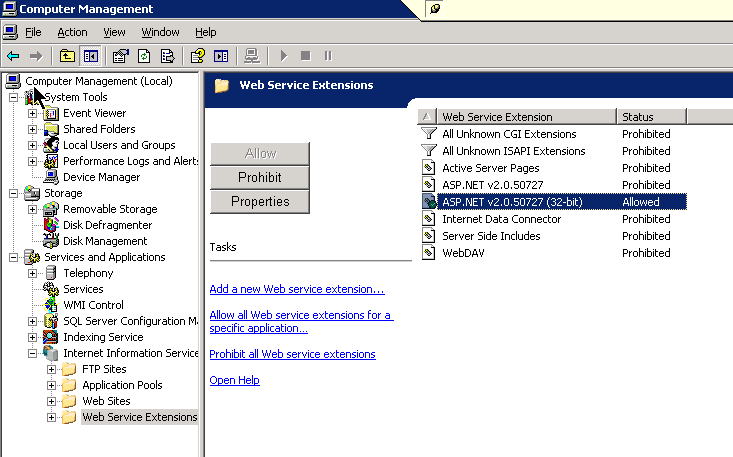
- Disabled 64bit ASP.NET web server extension and enabled the 32bit one in the IIS administration console
After that I decided to restart web server for "just in case....".
And it started to work!
So, watch out, the "Dll Hell" is still alive!
P.S.
Actually, my aspSmartImage dll was also required to install msvbvm50.dll library for Microsoft Visual Basic virtual machine.
I had to install it from
here.
After that it finally started working and I become the happiest man in the world :)