About Me

Showing posts with label C#. Show all posts

Monday, November 28, 2011

How to use LINQ with DataTable

LINQ came into .NET developers life and at present moment I can't imagine my life without it. Actually, I can imagine, but it will be horrible.

Few days ago I had to modify some old project that has ADO.NET code in it.
Unfortunately we still have to work with all that datasets and datatables from time to time.
However, we can make life easier if start to use LINQ for operating with that. Its really easy.

First of all you need to add a reference to System.Data.DatasetExtensions library from a project where you going to use LINQ.
That library, as you may see from the name, contains some extension methods that allows to write LINQ queries directly on DataTables.

public DeviceFamilyInfo Get(int deviceFamilyId)
{
 DataSet rawFamilyInfo = DBMethods.GetDeviceFamily(deviceFamilyId);
 EnumerableRowCollection tblDevices = rawFamilyInfo.Tables[1].AsEnumerable();

 List>DeviceInfo> devices = GetDevicesList(tblDevices);

 return rawFamilyInfo.Tables[0].AsEnumerable()
  .Select(f =< 
   new DeviceFamilyInfo(devices)
    {
     Id = (int) f["Id"], 
     FamilyName = (string) f["Name"]
    }).First();
}

As you may see, the secret in converting datatable into IEnumerable by calling of AsEnumerable() method from the referenced library.
After that conversion, you can do with your data whatever you want. In my case, i just wrote a simple mapper that converts a DataTable into  instance of DeviceFamilyInfo class

Convert datatable into entity with BLToolkit

BLToolkit is a very good library that can make life easier when working with ADO.NET.
I used it for one project as a mapper that converts a data from a database into objects.

Normally, you have to pass a procedure name to the method of the BLToolkit library with params, specify what type you need to return and that's all.
However, few days ago, i needed more complicated thing.
Instead of making BLToolkit to do an SQL request, i did it by myself and get the DataTable.
It was needed to get some specific data from a DataTable that can't be converted into the existing type.
After that I expected that I can convert the result DataTable into list of Entities

Fortunately BLTollkit is able not only to make a conversion of  SQL requests on the fly, but has methods that allows to pass a DataTable into it, specify a desired type and get a result collection.

public IList<IScoutProfileInfo> SearchScouts(string toSearch, out int totalItems)
{
 totalItems = 0;
 using (DbManager db = new DbManager())
 {
  DataTable dataTable = db.SetSpCommand("usp_ScoutProfile_Search", toSearch).ExecuteDataTable();
  var enumerableRowCollection = dataTable.AsEnumerable();

  if (enumerableRowCollection.Any())
  {
   totalItems = (int) enumerableRowCollection.First()["TotalItems"];
  }

  MappingSchema schema = new MappingSchema();
  return schema.MapDataTableToList<ScoutProfileInfo>(dataTable).OfType<IScoutProfileInfo<().ToList();
 }
}

As you may see, the MappingSchema.MapDataTableToList does the trick.

Wednesday, October 12, 2011

How to read a content of the text file in C#

While reading the book of Andrew Troelsen "C# 2010" I was very surprised when found really easy way how to read the content of the file.
What I always used to do when facing with the issue to read the content of the file is to use a filestream, read data to the bytes array and then convert it into text:
                
private static string ReadFile()
{
    FileInfo fileToRead = new FileInfo("SomeTextFile.txt");

    using (FileStream stream = fileToRead.OpenRead())
    {
        byte[] content = new byte[stream.Length];
        stream.Read(content, 0, content.Length);
        return Encoding.ASCII.GetString(content);
    }
}

private static string ReadFile2()
{
    FileInfo fileToRead = new FileInfo("SomeTextFile.txt");

    using (StreamReader stream = fileToRead.OpenText())
    {
        return stream.ReadToEnd();
    }
}
As you may see, the second method is much shorter then the first one. However, the code may be even more short:
                
private static string ReadFile3()
{
    return System.IO.File.ReadAllText("SomeTextFile.txt");
}
Look at the System.IO.File class! How many wonderful things it has inside that can make your code shorter and life easier!
 Below is few methods that will be very useful:

  • File.ReadAllLines("SomeTextFile.txt") - Opens the file read all lines and return you an array of lines instead of just a string
  • File.WriteAllLines("SomeTextFile.txt", new [] {"Line1", "Line2"}) - Opens a file and saves array of lines into it
  • File.WriteAllText("SomeTextFile.txt", "Line1\r\nLine2") - Opens a file and  writes a string into it.
There are much more.

The main benefit i see is that you should not care any more about closing the file after reading, handle streams and so on. Really, methods for lazy people! 
However, I still think its useful because can save your time for more important and interesting things!

Friday, September 23, 2011

Could not load file or assembly 'Skybound.Gecko, Version=1.9.1.0, Culture=neutral...

Today I was faced with the trouble how to make the Geckofx component.
They asked me to launch the project and see if its working on my side.
After i launched the code on my computer, I got following exception:


System.BadImageFormatException: Could not load file or assembly 'Skybound.Gecko, Version=1.9.1.0, Culture=neutral, PublicKeyToken=3209ac31600d1857' or one of its dependencies. An attempt was made to load a program with an incorrect format.
File name: 'Skybound.Gecko, Version=1.9.1.0, Culture=neutral, PublicKeyToken=3209ac31600d1857'
   at Zniper.Form1..ctor(ArrayList& arrayListImgHref, String xml, String webSiteURL, Dictionary`2 dic, String passedPath, ArrayList arrayOfWebSites, String browserPath, String outputPath)
   at Zniper.Code.MADCrawler.Crawl(ArrayList& arrayListImgHref, String xml, String webSiteURL, Dictionary`2 dic, String pathBaseLocation, ArrayList arrayOfWebSites, String browserPath, String outputPath) in C:\Work\Comscore\Src\Accurev\AMXM_INT\AdMetrix\src\Zniper\Code\MADCrawler.cs:line 44


=== Pre-bind state information ===
LOG: User = ....
LOG: DisplayName = Skybound.Gecko, Version=1.9.1.0, Culture=neutral, PublicKeyToken=3209ac31600d1857
 (Fully-specified)
LOG: Appbase = file:///C:/Work/Comscore/Src/Accurev/AMXM_INT/AdMetrix/src/Zniper/bin/Debug/
LOG: Initial PrivatePath = NULL
Calling assembly : Zniper, Version=1.0.0.0, Culture=neutral, PublicKeyToken=null.
===
LOG: This bind starts in default load context.
LOG: Using application configuration file: C:\Work\Comscore\Src\Accurev\AMXM_INT\AdMetrix\src\Zniper\bin\Debug\Zniper.exe.Config
LOG: Using machine configuration file from C:\Windows\Microsoft.NET\Framework64\v2.0.50727\config\machine.config.
LOG: Post-policy reference: Skybound.Gecko, Version=1.9.1.0, Culture=neutral, PublicKeyToken=3209ac31600d1857
LOG: Attempting download of new URL file:///C:/Work/Comscore/Src/Accurev/AMXM_INT/AdMetrix/src/Zniper/bin/Debug/Skybound.Gecko.DLL.
ERR: Failed to complete setup of assembly (hr = 0x8007000b). Probing terminated.


My configuration is Windows Vista 64bit and that's was the reason why it was not working.
The project was compiled with "Any CPU" value selected under "Platform target" property:


The solution was to change the Platform target to "x86".
After that the component started working as it should.

I hate such kind of troubles when you hitting the wall without no result. So, I hope that this post will help.

Monday, September 19, 2011

Good unit tests

This article is a short description of the way how to create good unit tests.
I want to recomend the book "The Art Of Unit Testing" to every one who is facing with requirements to cover its code with unit tests. Its really great book that contains enough descriptions and examples (in C#) to write the correct tests.
What's the "correct" tests are? Related to the book, "correct" tests should follow the following requirements:
  • It’s an automated piece of code that invokes a different method and
    then checks some assumptions on the logical behavior of that
    method or class.

    Correct unit test should contain 3 small piece of code - Arrange-Action-Assert (AAA):
    [Test]
    public void SetCurrentSpeed_NewSpeedOfThePlaneIsBiggerThenMinimumTakeOffSpeed_PlaneCanTakeOff()
      {
       ///Arrange - prepare object that is going to be tested
       Plane plane = PlanesFactory.CreatePlane(Planes.Boeing747_400);
       int takeOffSpeed = 160;
    
       ///Action - execute method that's going to be tested
       plane.SetCurrentSpeed(takeOffSpeed);
    
       ///Assert - test the state of the object
       Assert.IsTrue(plane.CanTakeOff);
    
      }
  • It’s written using a unit-testing framework.
    Normally you can use NUnit framework for it. Most of companies I worked for used NUnit. But, there are other you can also use. The principles are the same everywhere.
  • It can be written easily.
    As you may see in example above, its not need to create big amount of lines of code. The code should contain minimum lines of code. In my experience, most of unit test code is taking Arrange part. Its taking a lot of lines to initialize all objects and prepare them for the execution.
    Using Moq library can significant reduce the number of lines you have to type to create stubs of the components you are going to use in the test.
    For instance, in the example below we are going to test, is factory creates correct plane:
    [Test]
      public void SetCurrentSpeed_NewSpeedOfThePlaneIsBiggerThenMinimumTakeOffSpeed_PlaneCanTakeOff()
      {
       ///Arrange - prepare object that is going to be tested
       Mock<iwings> moqWings = new Mock<iwings>();
       moqWings.Setup(f => f.WingSize).Returns(100);
    
       ///Our factory will create plane according to the size of its wings.
       /// The take off speed depends of the size of the wing
       Plane plane = PlanesFactory.CreatePlane(moqWings.Object);
       int takeOffSpeed = 160;
    
       ///Action - execute method that's going to be tested
       plane.SetCurrentSpeed(takeOffSpeed);
    
       ///Assert - test the state of the object
       Assert.IsTrue(plane.CanTakeOff);
    
      }
    
    As you may see from the example, the PlanesFactory takes an object that describes wings of the plane. Without using Moq, you would need to create test class that implements IWing interface, create instance, set the size of the wing to 100 and only after that pass it to the the PlanesFactory. Moq is making your life easier, the code less and much more easier to understand - it creates the instance of IFly interface on the fly for you.
  • It runs quickly.
    This is obvious, as more simple your test code, as more fast it working
  • It can be executed repeatedly by anyone on the development team.
    One of the purpose of writing unit tests is to make the life of your coworkers easier. When the guy from your team want to change your code or a code in a functionality that relates to the one you created, he need to be sure, that he did not break something.
    The guy is changing the code, then running all existing unit tests and saying "Woohoo! I did not break anything!". As more the code of your applicaiton is covered with the unit tests, as more free can feel the developer while adding a modifications to the code.
Things above are principles of writing unit tests.
Below, I going to specify few  important recommendations about the structure of the unit test.
They were also taken from the book with my short explanation.


  • It’s common practice to have one test class per tested class, one test
    project per tested project, and at least one test method per tested method.
    This advice related to the structure of your code. Everything is obvious here. To make the code clear and easy to read and modify, create a separate file for each testing class.
    In my opinion, sometimes, when you are writing a test to some manager class that contains a lot of methods independent from each other, its better to have one class for each testing method. In this case, its better to create a folder with the name of the manager class and put there all methods testing classes:
  • Name your tests clearly using the following model: [MethodUnderTest]_[Scenario]_[ExpectedBehavior].
    As you may see in example above, my test class is following to the requirement and has name "SetCurrentSpeed_NewSpeedOfThePlaneIsBiggerThenMinimumTakeOffSpeed_PlaneCanTakeOff".
    The reason of naming the method in this way is that its much easier to understand which tests did not pass, what functionality they do and where are they are locating.
    You may also be less strict in using the rule. The main idea of naming the test method is that  its name should follow if/then manner : "If_I_Put_New_Speed_Of_Plane_To_The_Value_That_Is_Bigger_Then_A_TakeOff_Speed_Then_CanTakeOff_property_should_be_set". This name can be also quite informative.
  • Use the [SetUp] and [TearDown] attributes to reuse code in your tests, such as code for creating and initializing objects all your tests use.
    If your test requires initialization of the DB or some complex object like COM, this staff should be placed to the [SetUp] method. The reason is simple - to keep the testing code as much simpler as possible.
    If you have few classes that doing the same in [SetUp] and [TearDown], create an abstract test class and move all logic in there. Then create your tests as inheritors of that base class.
    Don't confuse two attributes [SetUp] and [SetUpFixture]. [SetUp] is calling before EACH TEST in a test class and [SetUpFixture] is calling before FIRST TEST in a class will be called.
  • Don’t use [SetUp] and [TearDown] to initialize or destroy objects that
    aren’t shared throughout the test class in all the tests, because it makes
    the tests less understandable. Someone reading your code won’t
    know which tests use the logic inside the setup method and which
    don’t.

    Let's take a look on the example below:
    [TestFixture]
     public class PlaneTests
     {
      private iengine[] _enginesForTestCollection;
    
      [SetUp]
      public void SetUp()
      {
       Mock<iengine>() engine1 = new Mock<iengine>();
       engine1.Setup(f => f.Power).Returns(50);
    
       Mock<iengine>() engine2 = new Mock<iengine>();
       engine2.Setup(f => f.Power).Returns(99);
       
       _enginesForTestCollection = new IEngine[] {engine1.Object, engine2.Object};
      }
    
      [Test]
      public void SetCurrentSpeed_NewSpeedOfThePlaneIsBiggerThenMinimumTakeOffSpeed_PlaneCanTakeOff()
      {
       ///Arrange - prepare object that is going to be tested
       ...
       
       Plane plane = PlanesFactory.CreatePlane(moqWings.Object, _enginesForTestCollection[0]);
       int takeOffSpeed = 160;
    
       ///Action - execute method that's going to be tested
       plane.SetCurrentSpeed(takeOffSpeed);
    
       ///Assert - test the state of the object
       Assert.IsTrue(plane.CanTakeOff);
    
      }
    
      [Test]
      public void SetCurrentSpeed_NewSpeedOfThePlaneIsLessThenMinimumTakeOffSpeed_PlaneCanNotTakeOff()
      {
       ///Arrange - prepare object that is going to be tested
       ...
       Plane plane = PlanesFactory.CreatePlane(moqWings.Object, _enginesForTestCollection[1]);
       int takeOffSpeed = 120;
    
       ///Action - execute method that's going to be tested
       plane.SetCurrentSpeed(takeOffSpeed);
    
       ///Assert - test the state of the object
       Assert.IsFalse(plane.CanTakeOff);
    
      }
    
     }
    
    As you may see, I doing the thing that should not - initializing engines in the setup variable.
    I'm expecting, that my _enginesForTestCollection will have an engine for each test.
    Then, when I'm writing test, I'll use an appropriate engine.
    First problem with this approach is that when new guy, or even you, will read this code in the future, he will have to find, where is _enginesForTestCollection[1] is initializing and check the initial values of it. When your test class contains dozen of tests, it may be difficult.
    The second problem may come when you will want to write new test. In this case you will have a temptation to use one of existing engines. Then, if requirements will change and you will need to change the parameters of the engine, this change will affect two or more tests, depends of how many times you used the same engine. As result, some tests may not working or, what's more dangerous, some tests will remain success but they will not test things that were expected at the beginning.
    That's why its better to create each engine in its own test method and don't create unique moq for all tests.

Thursday, August 11, 2011

Export to Excel in C#. CSV format.

Very often, I receive requests to export some data into Excel.
Most of time its just plain table of values that have text or numeric columns.
At the beginning I tried different libraries that can create Excel documents with the data.
After that I found the CSV format.
Its really easy. All you need is to write values row by row into the text file and separate each column by coma.
Then Excel or Open Office will easily parses your text file and opens it without any problem.
You should no more worry neither about a library or version of the Excel - CSV is very easy to build and use:
		public byte[] BuildSpreadsheetVersionOfReport()
		{
			int totalRecords;

			List reports = BrowseReports();

			StringBuilder bld = new StringBuilder();

			bld.AppendLine("Event Id, Submitted Date/Time, Contracted Manufacturer, Status, Status Date/Time, Partner");

			foreach (ManufacturerReport report in reports)
			{
				bld.AppendFormat("{0},{1},{2},{3},{4},{5}\r\n", 
					report.EventId, 
					report.SubmittedDate, 
					report.ManufacturerName.GetCSVEncodedValue(), 
					report.Status.ToString().GetCSVEncodedValue(), 
					report.ReportAudit.EventDate, 
					report.Partner.Code.GetCSVEncodedValue());
			}

			return Encoding.ASCII.GetBytes(bld.ToString());
		}

As you may see, everything is simple. I'm just using a StringBuilder to build a list of rows with values.

However, there are two important things!

1. According to a CSV format description, there are few characters like comma, newline or double quote that's reserved for the format. So, if your report has that values, you should enclose them in double quote.
That's why I'm using GetCSVEncodedValue() extension method for some of my text values where reserved characters may appear :
		public static string GetCSVEncodedValue(this string val)
		{
			if (string.IsNullOrEmpty(val))
				return "\"\"";

			val = val.Replace("\"", "\"\"");

			if (val.Any(f => new[] { ',', '\"' }.Contains(f))
				|| val.IndexOf(Environment.NewLine) != -1
				|| val.StartsWith(" ")
				|| val.EndsWith(" "))
				return String.Format("\"{0}\"", val);

			return val;
		}

2. The second important thing is also relates to enclosing special characters with adouble quotes.
Compare two strings that's using as a templates in a String.Format for building each row of data:
bld.AppendFormat("{0},{1},{2},{3},{4},{5}\r\n",.....
and
bld.AppendFormat("{0}, {1}, {2}, {3}, {4}, {5}\r\n",.....
As you may see, in the second example there is a space between a comma and a value. Since we enclosing the string with a double quote, the results will be as following
"Value1","Value2, and a special character","Value3 \r\n"....
and
"Value1", "Value2, and a special character", "Value3 \r\n"....
The important thing is that second example will not work. Excel, as well as Open Office treats enclosing with a double quote only if the double guote starts right after the comma that delimits one value from another. As you may see, there is a space between a comma and a first double qoute.
This will cause that the end the file will be broken and can't be recognized correctly.

At the end its very easy to use generated content and return it to the customer as a CSV file (ASP.NET MVC code):
		public ActionResult CsvExport(OrderByInfo orderByInfo, ReportFilter filter)
		{
			return File(
				distributionReportManager.BuildSpreadsheetVersionOfReport(),
								"text/csv", 
								"ExportFile.csv");
		}

Wednesday, August 10, 2011

Convert enum to a custom string

Enums are really usefull.
I'm using them in each application.
The primary benefit of using enum is that it makes your code more readable.
If you have variables that should has only strict number of values, then enums is really what you should use.
For example, if you have class that describing a person, its always better to have a property containing Gender.Male or Gender.Female then using just a string  "Male" or number "1" meaning that this is male and "0" for female.
Its not a problem even if you have dozen values, like age kinds:

public enum Age
{
  Unknown,
  Infant,
  Child,
  Adolescent,
  Adult,
  MatureAdult,
  OlderAdult,
  AgedAdult,
  Neonate
 }

If you are using enum you will be always sure that the code will not compile if you make a typo and type "Chaild" instead of "Child".
Its also much easy to add new states to the list when you need it.
In other words you are keep control all possible values that your variable may has. At the same time, the value  of the variable is looking friendly and well readable.

One of the problem with this approach is to show custom text that should be associated with the Enum value.

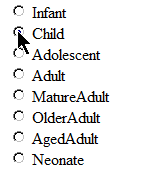
For instance, you want to build optional list that contains all possible values of the Age enum:
As you may see, the list looks ugly because the text is not readable at all. Also, you may want to describe each state and specify which age range is for each option so the user will be easy to select proper value :

To build such select list you should create a relation between the enum value and custom text value:

ASP.NET MVC Controller code:
public ActionResult Index()
        {
         Array values = Enum.GetValues(typeof(Age));
   List<KeyValuePair<string,string>> enumValues = new List<KeyValuePair<string, string>>();
         
   foreach (int value in values)
   {
    string text = string.Empty;
          switch ((Age)value)
          {
           case Age.Unknown:
            text = "Unknown";
            break;
           case Age.Infant:
            text = "Infant (>28 days<1 year)";
            break;
           case Age.Child:
      text = "Child (1-12 years)";
            break;
           case Age.Adolescent:
      text = "Adolescent (13-17 years)";
            break;
           case Age.Adult:
      text = "Adult (18-64 years)";
            break;
           case Age.MatureAdult:
      text = "Mature Adult (65-74 years)";
            break;
           case Age.OlderAdult:
      text = "Older Adult (75-84 years)";
            break;
           case Age.AgedAdult:
      text = "Aged Adult (>85 years)";
            break;
           case Age.Neonate:
      text = "Neonate (0-28 days)";
            break;
           default:
            throw new ArgumentOutOfRangeException();
          }
          
    enumValues.Add(new KeyValuePair<string, string>(text,value.ToString()));
         }
         
   ViewData["Ages"] = enumValues;
            
   return View();
        }

ASP.NET MVC View code:
<body>
    <% foreach (KeyValuePair<string,string> enumValue in (IEnumerable<KeyValuePair<string, string>>) ViewData["Ages"])
    { %>
      <%= Html.RadioButton(enumValue.Key, enumValue.Value)%>  
      <%= Html.Label(enumValue.Key, enumValue.Key)%> <br />
    <%
    } 
    %>
</body>

As you may see to build such relation, you should reserve some place in your code to have all this friendly strings and remember where this place is locating.
If you going to use it again, you should either copy/paste the same text or move it to the some class.
Both ways are not good because you and other developers of your project should always remember where is the place where the text can be changed.
Its great that there is a solution that allows to have custom text in the same place where you have Enum definition. You should use an attribute System.ComponentModel.DescriptionAttribute 
The attribute allows to specify any text as description for each enum element:
public enum Age
 {
  Unknown,
[Description("Infant (>28 days<1 year)")]
  Infant,
[Description("Child (1-12 years)")]
  Child,

  [Description("Adolescent (13-17 years)")]
  Adolescent,

  [Description("Adult (18-64 years)")]
  Adult,

  [Description("Mature Adult (65-74 years)")]
  MatureAdult,

  [Description("Older Adult (75-84 years)")]
  OlderAdult,

  [Description("Aged Adult (>85 years)")]
  AgedAdult,

  [Description("Neonate (0-28 days)")]
  Neonate
 }

When Enum is defined like above, its easy to get those custom text values with simple extender that's using reflection:

public static class EnumExtender
 {
  public static string GetDescription(this Enum en)
  {
   return GetDescription(en.GetType(), en.ToString());
  }

  public static string GetDescription(Type enumType, Enum en)
  {
   return GetDescription(enumType, en.ToString());
  }

  public static string GetDescription(Type enumType, string name)
  {
   MemberInfo[] members = enumType.GetMember(name);
   if (members.Length > 0)
   {
    MemberInfo mi = members[0];
    object[] attrs = mi.GetCustomAttributes(typeof(DescriptionAttribute), false);

    if (attrs.Length == 1 && attrs[0] is DescriptionAttribute)
    {
     DescriptionAttribute attr = (DescriptionAttribute)attrs[0];
     return attr.Description;
    }
   }
   return name;
  }

 }

In this way the code that builds custom text looks much better :
public ActionResult Index()
        {
         Array values = Enum.GetValues(typeof(Age));
   List<KeyValuePair<string,string>> enumValues = new List<KeyValuePair<string, string>>();
         
   foreach (int value in values)
   {
    string customText = ((Age)value).GetDescription();
    string enumValue = value.ToString();
    KeyValuePair<string, string> keyValuePair = new KeyValuePair<string, string>(customText, enumValue);

    enumValues.Add(keyValuePair);
   }

         ViewData["Ages"] = enumValues;
            
   return View();
        }

Tuesday, February 22, 2011

How to make Moq object to return different values on each invocation

Today I stacked with the issue how to make Moq function to return different values when its calling by testing unit.

Let's see on example:
[Test]
public void Value_should_be_assigned_on_property_value()
{
///Arrange
...
DrugAgreement agreement = new DrugAgreement();

agreementsManager.Setup(f => f.Create()).Returns(agreement);

///Action
testingUnit.AssignPropertyOnNewlyCreatedObject("propertyValue");

///Assert
Assert.AreEqual("propertyValue", agreement.TestingProperty);
}

The code above expecting that the testing unit will create new instance of the object by calling Create, and change its TestingProperty value to propertyValue

Now, let's implement the code for it:
public DrugAgreement AssignPropertyOnNewlyCreatedObject(string newValue) {
    var obj = manager.Create();
    obj.TestingProperty = newValue;
    return obj;
}

The code above will work as expected.
Now imagine that we mistakenly called Create for the second time after the property was set:
public DrugAgreement AssignPropertyOnNewlyCreatedObject(string newValue) {
    var obj = manager.Create();
    obj.TestingProperty = newValue;
    obj = manager.Create();
    return obj;
}

For the first look, the test above should fail, but it is not!
The test says that TestingProperty is equal to propertyValue, but the object is different. We called Create for the second time and expecting that manager is stateless and don't remember previously returned instance.
The answer is simple - our mock manager returns the same instance of object every time when Create is calling.

So, how to test this ?
How to make sure that Create method is stateless and always returns different objects?

Here is the corrected test:

[Test]
public void Value_should_be_assigned_on_property_value()
{
    ///Arrange
    ...
    DrugAgreement agreement = new DrugAgreement();

    agreementsManager.Setup(f => f.Create()).Returns(agreement).Callback(()=> agreement = new DrugAgreement());

    ///Action
    testingUnit.AssignPropertyOnNewlyCreatedObject("propertyValue");

    ///Assert
    Assert.AreEqual("propertyValue", agreement.TestingProperty);
}

If we test our code now it will fail as it should.
As you can see, the difference in the test is in calling Callback function by moq manager . That function instantiates new instance of DrugAgreement class after each call.

In this case our manager is really stateless and always return different instances

Wednesday, February 16, 2011

Dynamic windows service name

Today i had to install few instances of the same windows service.
Of course they should be named differently.

I found that the name should be set to the ServiceName property of service installer.
This means, that i need to pass a name of the service when I installing it.

I found few solutions, but the most usefull for me, is when the installing is asking me for exact name before it installs the service.
Here is the code that should be placed into the service installer codebehind file (in my case it is ProjectInstaller.cs):
[RunInstaller(true)]
    public partial class ProjectInstaller : Installer
    {
        public ProjectInstaller()
        {
            InitializeComponent();
        }

  private void BeforeInstallEventHandler(object sender, InstallEventArgs e)
  {

   // Add steps to perform any actions before the install process.

   Console.WriteLine("BeforeInstallEventHandler Called");

   Console.WriteLine("Enter the name you would like this service installed as:");

   serviceInstaller.ServiceName = Console.ReadLine();

   PersistServiceName(serviceInstaller.ServiceName);

   Console.WriteLine("Attempting to install service as: " + serviceInstaller.ServiceName);

  }

  private void BeforeUninstallEventHandler(object sender, InstallEventArgs e)
        {

            Console.WriteLine("BeforeUninstallEventHandler Called");

            serviceInstaller.ServiceName = RetrieveServiceName();

            // Add steps to perform any actions before the Uninstall process.

            Console.WriteLine("Code for BeforeUninstallEventHandler");

        }

  /// 
  /// Storing name of the service to the 
  /// config file, for using duing uninstall
  /// process
  /// 
        private void PersistServiceName(string serviceName)
        {

            TextWriter tw = new StreamWriter("Service.config", false);      

            tw.WriteLine(serviceName);

            tw.Close();

        }

  /// 
  /// Getting stored service name from
  /// the file during uninstall process
  /// 
  /// 
        private string RetrieveServiceName()
        {

            string serviceName;


            TextReader tr = new StreamReader("Service.config");

            serviceName = tr.ReadLine();

            tr.Close();

            Console.WriteLine("ServiceName" + serviceName);

            return serviceName;      
        }
    }

Project installer has few events. The code above is using two of them - BeforeInstallEventHandler and BeforeUninstallEventHandler. First one is using to ask the user the service name and store it to the config file.
The second one is using during uninstallation process to retrieve service name from the file and pass it to uninstall process.
Thus, don't forget to open ProjectInstaller.cs designer and assign its BeforeInstall and BeforeUninstall events with appropriate handlers (BeforeInstallEventHandler and BeforeUninstallEventHandler)

Thursday, January 20, 2011

WatiN UI testing of autocomplete textbox created with jquery.autocomplete

While writing UI tests for one web project, I were faced with the trouble.
There is a textbox on the page where user can type first letters and the system shows all possible values that can be selected by the user.
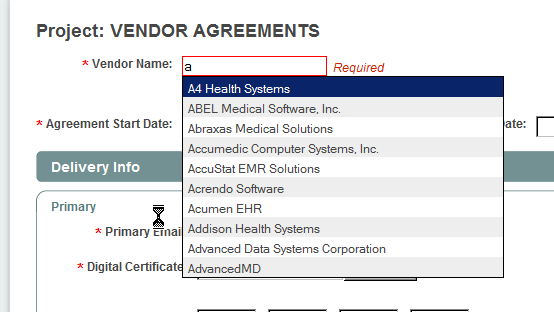
On the client side it was created with jquery.autocomplete:


I'm using WatiN library for writing UI tests and the regular approach, that I tried to use was not working.
Below is the code that emulates inserting of character 'a' then waits for autocomplete textbox appears and select first item:

IE _ie = new IE("URL-of-the-page-with-autocompleter");

//Typing letter 'a' and emulates keyboard
_ie.TextField("VendorName").TypeText("a");
_ie.TextField("VendorName").KeyDown();

//Wait while autocomplete making AJAX call
//and open the results
_ie.Div(f => !string.IsNullOrEmpty(f.ClassName) 
    && f.ClassName == "ac_results").WaitUntilExists(6);

//Selecting first item
_ie.Div(f => !string.IsNullOrEmpty(f.ClassName) 
    && f.ClassName == "ac_results")
    .ElementsWithTag("ul")
    .FirstOrDefault()
    .Click();

_ie.WaitForComplete();
The second line of code is important. KeyDown method for the textfield should be called to make autocompleter show search results.

Tuesday, January 11, 2011

How to create a single-instance windows application in .NET

Today I found really good and simple way how to create single-instance windows application in .NET.
By meaning single-instance i mean the application that can't be launched twice at the same time.

The way is using Mutex object that is in System.Threading namespace:

using System;
using System.Collections.Generic;
using System.Linq;
using System.Threading;
using System.Windows.Forms;

namespace SingleToneApplication
{
 static class Program
 {
  private const string APP_ID = "f87f4871-fc32-4032-82f6-ba3b3026faa4";
  /// 
  /// The main entry point for the application.
  /// 
  [STAThread]
  static void Main()
  {
            bool isItFirstInstance;
   
   using (Mutex m = new Mutex(true, APP_ID, out isItFirstInstance)) 
   {
    if (!isItFirstInstance) {
     MessageBox.Show("There is already an instance running!");
     return;
    }

    Application.EnableVisualStyles();
    Application.SetCompatibleTextRenderingDefault(false);
    Application.Run(new MainForm());

   }

  }
 }
}

As you may see, the code creating new Mutex object and pass APP_ID parameter.
The APP_ID is just a string that may contain any text. The main rule is that the text must be unique. I decided to use GUID for it.

As said on Microsoft site : "Mutex is a synchronization primitive that grants exclusive access to the shared resource to only one thread. If a thread acquires a mutex, the second thread that wants to acquire that mutex is suspended until the first thread releases the mutex." Since each application is using separate thread, we may use this way.

isItFirstInstance property is initializing by the constructor. Returned value indicates that the Mutex with specified unique name was created or not. So, if the returned value is false, then the mutex was already created in another application.
Then we may use this flag to decide, do we need to run the application or exit.

Wednesday, December 29, 2010

Why abstract method can't be private

Not so far ago I had to use abstract class for one business implementation.
I quickly typed the construction of abstract class and then found that the intelisense mark some code as invalid:
My first question was "Why?!".
Why abstract method can't be private ?

Here is the answer that came into my brain in the next second:

Abstract clause means that the method should be overriden in the classes that are inheriting from the base class.
In this case, each inheritor from Foo class should implement Method1, Method2 and Method3
Inheritor, can see only public and protected members of the base class. 
So, there is no way to implement Method3 because it marked as private.

No need to remember all the rules about all that OOP tricks in .NET, its only need to use your brain and ask "Why?" at the right moment. There is always logical explanation for it.