About Me

Showing posts with label Issues. Show all posts

Friday, September 23, 2011

Could not load file or assembly 'Skybound.Gecko, Version=1.9.1.0, Culture=neutral...

Today I was faced with the trouble how to make the Geckofx component.
They asked me to launch the project and see if its working on my side.
After i launched the code on my computer, I got following exception:


System.BadImageFormatException: Could not load file or assembly 'Skybound.Gecko, Version=1.9.1.0, Culture=neutral, PublicKeyToken=3209ac31600d1857' or one of its dependencies. An attempt was made to load a program with an incorrect format.
File name: 'Skybound.Gecko, Version=1.9.1.0, Culture=neutral, PublicKeyToken=3209ac31600d1857'
   at Zniper.Form1..ctor(ArrayList& arrayListImgHref, String xml, String webSiteURL, Dictionary`2 dic, String passedPath, ArrayList arrayOfWebSites, String browserPath, String outputPath)
   at Zniper.Code.MADCrawler.Crawl(ArrayList& arrayListImgHref, String xml, String webSiteURL, Dictionary`2 dic, String pathBaseLocation, ArrayList arrayOfWebSites, String browserPath, String outputPath) in C:\Work\Comscore\Src\Accurev\AMXM_INT\AdMetrix\src\Zniper\Code\MADCrawler.cs:line 44


=== Pre-bind state information ===
LOG: User = ....
LOG: DisplayName = Skybound.Gecko, Version=1.9.1.0, Culture=neutral, PublicKeyToken=3209ac31600d1857
 (Fully-specified)
LOG: Appbase = file:///C:/Work/Comscore/Src/Accurev/AMXM_INT/AdMetrix/src/Zniper/bin/Debug/
LOG: Initial PrivatePath = NULL
Calling assembly : Zniper, Version=1.0.0.0, Culture=neutral, PublicKeyToken=null.
===
LOG: This bind starts in default load context.
LOG: Using application configuration file: C:\Work\Comscore\Src\Accurev\AMXM_INT\AdMetrix\src\Zniper\bin\Debug\Zniper.exe.Config
LOG: Using machine configuration file from C:\Windows\Microsoft.NET\Framework64\v2.0.50727\config\machine.config.
LOG: Post-policy reference: Skybound.Gecko, Version=1.9.1.0, Culture=neutral, PublicKeyToken=3209ac31600d1857
LOG: Attempting download of new URL file:///C:/Work/Comscore/Src/Accurev/AMXM_INT/AdMetrix/src/Zniper/bin/Debug/Skybound.Gecko.DLL.
ERR: Failed to complete setup of assembly (hr = 0x8007000b). Probing terminated.


My configuration is Windows Vista 64bit and that's was the reason why it was not working.
The project was compiled with "Any CPU" value selected under "Platform target" property:


The solution was to change the Platform target to "x86".
After that the component started working as it should.

I hate such kind of troubles when you hitting the wall without no result. So, I hope that this post will help.

Friday, March 4, 2011

Using ActiveX DLL in ASP.NET web applications under Windows Server 2003 64bit

Today I got a request to install our old web application into the new server.
It was a Windows 2003 Standard 64bit edition with SP2.

In our project we are using aspSmartImage ActiveX dll component to convert incoming images into the format that suit for our needs.
Everything was fine during our moving to the new server, but at the end I suddenly realized, that the aspSmartImage component is not working.
Log said, there was a problem with loading the DLL:


Retrieving the COM class factory for component with CLSID {28D7EF94-7F68-469E-B5B2-E7F08B62C294} failed due to the following error: 80040154


Usually, when i got such message, I do the same thing :
  1. Start -> Run -> cmd
  2. regsvr32.exe aspSmartImage.dll
Regsvr32 command registers COM component to the registry and .NET is able to access it as well as other applications.
Since aspSmartImage is a COM library, i had strong hope that it will help.
Unfortunately, for this time, nothing came out and I started looking for other ways.

After few hours of searching I finally realized that i have 64 bit server and the old one was not. And that was a problem, because IIS 6.0 is running in 64bit mode by default. 
IIS 6.0 does not allow mixing 64bit and 32bit web applications at the same time, so, its running everything as 64bit.
When my web application was trying to access the DLL, it was unable to do that because that DLL is not 64bit.
I realized that the only way to make it work is to make IIS 6.0 to work in 32 bit mode.

Below is what I did to switch IIS 6.0 into 32bit mode  (found it at microsoft website):
  1. Start -> Run -> cmd
  2. cd %systemdrive%\Inetpub\AdminScripts
  3. cscript.exe adsutil.vbs set W3SVC/AppPools/Enable32BitAppOnWin64 1
  4. %SYSTEMROOT%\Microsoft.NET\Framework\v2.0.50727\aspnet_regiis.exe -i
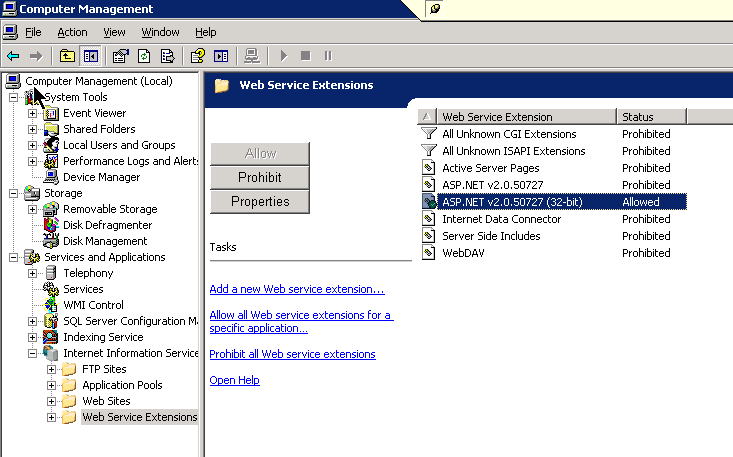
  5. Disabled 64bit ASP.NET web server extension and enabled the 32bit one in the IIS administration console


After that I decided to restart web server for "just in case....". 
And it started to work!

So, watch out, the "Dll Hell" is still alive!

P.S. 
Actually, my aspSmartImage dll was also required to install msvbvm50.dll library for Microsoft Visual Basic virtual machine. 
I had to install it from here
After that it finally started working and I become the happiest man in the world :)


Thursday, November 18, 2010

Maximum length of Excel worksheet name can't be more then 31 characters

Today I was faced with very weird issue.
In our programm we are generating Excel reports.
There are many page in it. 
Each of the page is describing its own location.
Location names are storing in the database and putting to the Excel document as the name of the sheet.

Today, people started  complaint that they can't open the file.
During opening, Excel show very strange exception about incorrect format of the file:


The content of the log file told me, that the content of the file is wrong, but did not tell me where exactly is the issue. So, i had to start searching  it by myself.
I found that nothing has changed in the database except of  few new locations were added.
After comparing that locations with other that was added earlier, we found, that few of them are very long.

I had to cut the name of the location to 31 characters to solve the issue.


If you editing Excel file manually, Excel does not let you to type more then 31 characters in the name of the sheet. But, if you creating document dynamically, as we do with some .NET component, its easy to avoid this limitation and enter any length you want.

So, even in Microsoft Office 10, the name of the Excel sheet has so huge limitation.